
The Complete Guide to Building AI Agents
8 patterns, when to use them, and why most tutorials overcomplicate this

You’ve probably watched a dozen YouTube tutorials where someone wraps an OpenAI API call in Python and calls it a day. Sure, that works. But is it production ready? Not even close.
I’ve been wanting to really understand this stuff. Not just copy paste code and hope for the best. Actually get the concepts clear on how to build agents that don’t fall apart the moment something unexpected happens.
For some actual code, you can follow the Github repo where I am committing all that I am learning about AI Agents.
So let’s start at the beginning. What even is an agent?
What Is An Agent?
Here’s how Anthropic defines it:
“Agent” is one of those words everyone throws around but nobody agrees on.
Some people think agents are these fully autonomous systems that just run on their own for hours, juggling tools and solving complex problems without any hand holding. Others use the same word for stuff that basically follows a script you wrote beforehand.
Anthropic groups all of this under “agentic systems” but they make one really useful distinction.
Workflows are when you write the code that decides what happens. The LLM does its thing, but you’re the one calling the shots on what tool runs when and in what order. It’s like a recipe. Step one, step two, step three. Predictable.
Agents are different. The LLM itself decides what to do next. It picks the tools. It figures out the order. You give it a goal and it works out the path on its own.
One follows your playbook. The other writes its own.
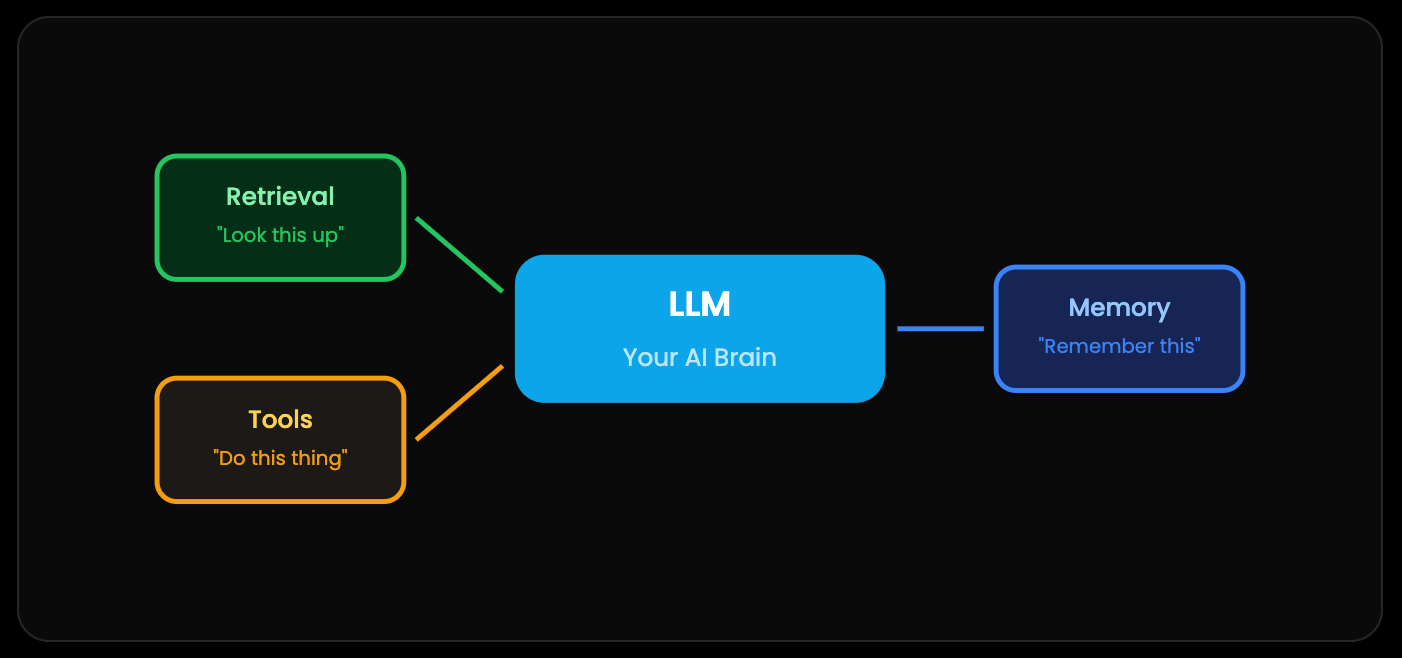
The 8 Core Patterns
Pattern 1: Basic LLM Calls — The Amnesiac Genius
Let’s start with the basics. An LLM is brilliant but also kind of forgetful. Like that friend who’s crazy smart but can’t remember what you told them five minutes ago.
Every time you make an API call, the model starts completely fresh. Zero context. Total amnesia. If you ask “Tell me about France” and then follow up with “What’s the capital?”... the AI has no clue you’re still talking about France. It’s not being dumb. It literally doesn’t know.
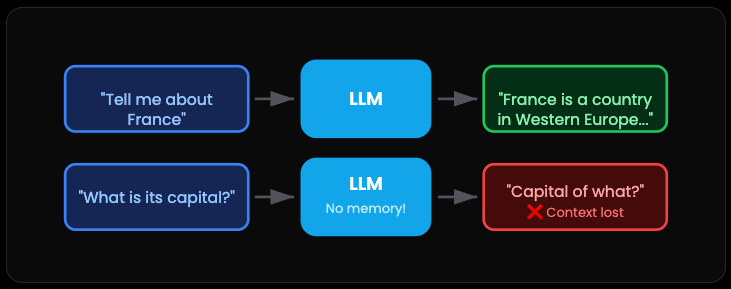
The catch: So you’ve got two options. Either cram all the context into every single request, or build something smarter on top.
Which brings us to...
Pattern 2: Conversation Chaining — The Conversation Scribe
Here’s the simple fix for the amnesia problem. Just write everything down.
You keep a running transcript of the entire conversation. Every question, every response. Then you send the whole thing back with each new message. Now when you say “Rome,” the AI gets it because it can see you’ve been talking about Italy this whole time.
Think of it like a court stenographer for your AI. Nothing gets lost.
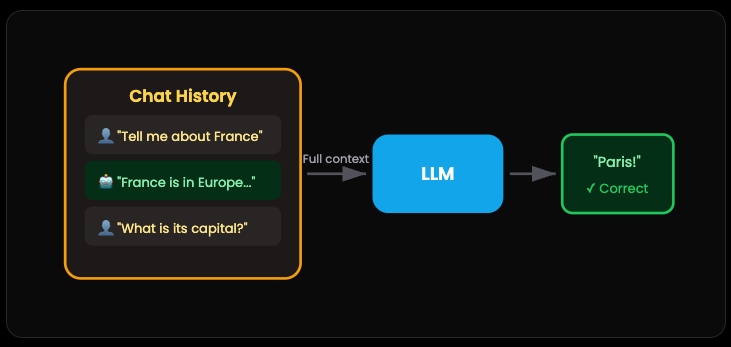
When you need this: This is basically table stakes for anything beyond a quick one-off question. Planning a trip? Writing an essay? Any task with multiple steps needs this. Research leads to outline leads to draft leads to revision. Without conversation history, none of that works.
The catch? Context windows aren’t infinite. Eventually you’ll need to summarize or trim old messages. But that’s a problem for later.
Pattern 3: LLM Orchestration — The Creative Team
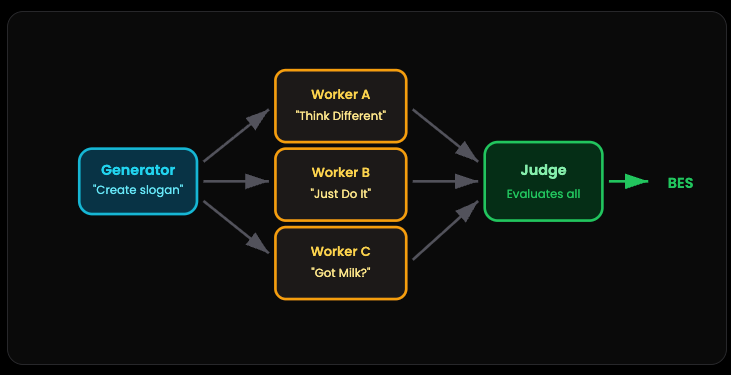
This one’s clever. Instead of asking one AI to do everything, you build a team.
Picture a brainstorming session. You’ve got a Generator that comes up with ideas. Let’s say three different marketing slogans. Then you’ve got Worker AIs that each develop their version. Finally, a Judge AI looks at all the options and picks the winner.
Why bother with all this? Because a single model trying to generate AND evaluate at the same time usually settles for “good enough.” But when you separate the jobs — creative generation versus critical evaluation — you get better results. And cheaper too. The workers can be smaller models. The judge does the heavy lifting.
It’s the AI version of “two heads are better than one.” Except here it’s three AIs, and one of them is specifically hired to be picky.
The real win: This is how you get GPT-4 quality results while using cheaper models for most of the work.
Pattern 4: RAG — The Open-Book Exam
RAG stands for Retrieval-Augmented Generation. Sounds fancy but it’s actually super practical.
Here’s the problem. Retraining an LLM on your company’s docs is expensive and slow. But what if you could just hand it a cheat sheet?
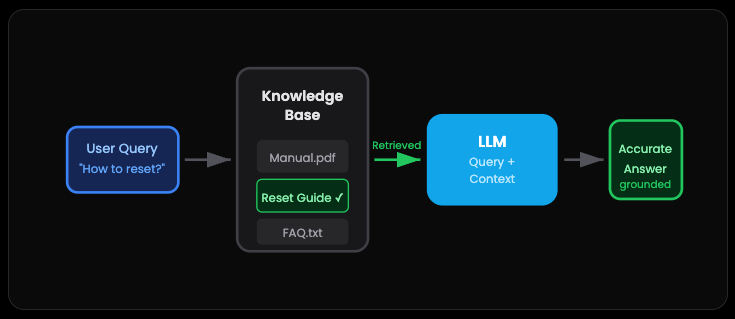
That’s RAG. When a customer asks “How do I reset my device?”, you don’t rely on whatever the AI learned during training. You grab the relevant section from your actual product manual, stuff it into the prompt, and let the AI answer based on your documentation
The answers stay grounded. No hallucinations about features that don’t exist. No outdated info from whenever the model was trained. Just accurate responses based on sources you control.
It’s like giving a student an open book exam instead of expecting them to memorize the textbook. Way better for factual accuracy.
This is why ChatGPT added file uploads, and why every company can now build custom AI without ML engineers. RAG democratized AI.
Pattern 5: Tool Use — The Digital Handyman
This is where things get genuinely exciting.
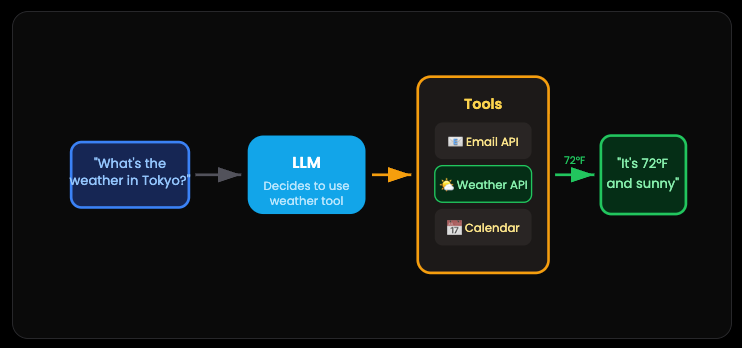
By default, an LLM can only talk. It can tell you the weather might be 72°F and sunny in Tokyo. But it’s guessing. Give it access to a weather API? Now it actually checks.
Tool use transforms the AI from a conversationalist into something that does things. Send emails. Book appointments. Query databases. Run code. The AI decides when to use which tool, makes the call, processes the result, and responds.
The mental shift here is huge. You’re not building a chatbot anymore. You’re building something that can interact with the real world. With guardrails, obviously.
Most of the “magic” you see in AI products today comes down to clever tool orchestration. The AI isn’t inherently capable of booking your flight. But it can call an API that is.
This loop is the foundation of every production AI agent. This is how ChatGPT plugins work. This is how ALL AI agents work.
Pattern 6: Evaluation — The Quality Control Inspector
Never trust AI output blindly. That’s the rule.
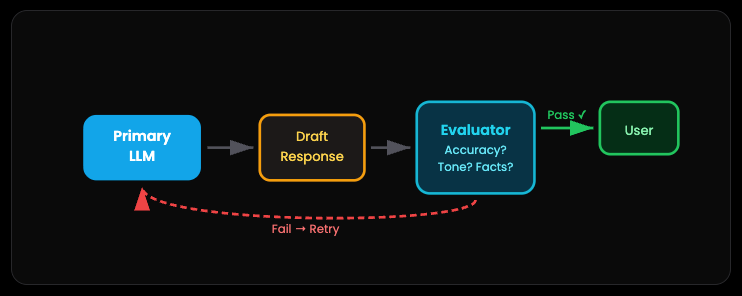
This pattern adds a second LLM as a safety net. Before your AI’s response reaches the user, an Evaluator checks it against your source documents. Is it accurate? Does the tone match your brand? Any hallucinations?
If something’s off, the response gets kicked back for revision. The user never sees the mistake.
It’s like having an editor review every article before you hit publish. Yes, it adds latency and cost. But when you’re building something that matters — customer support, legal documents, medical info — the extra check is worth it.
Some teams even set up specific criteria for the evaluator. Factual accuracy, response formatting, sensitivity screening. It becomes your quality gate.
Without evaluation, you’re hoping your AI doesn’t mess up. With evaluation, you’re guaranteeing quality. Hope is not a strategy in production
Pattern 7: Production Agent Class — The Professional Blueprint
Now we combine everything.
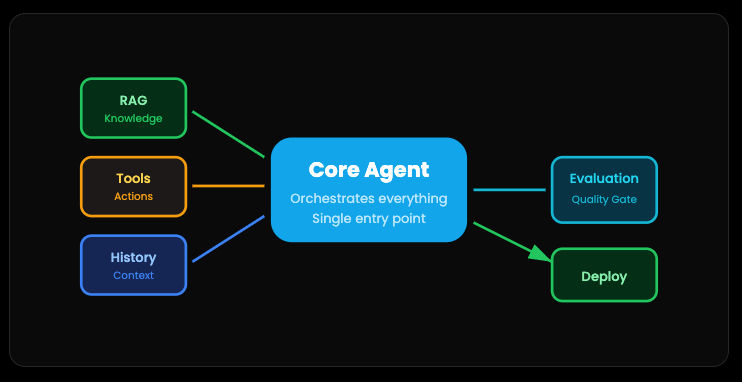
A production-ready AI agent isn’t just one pattern. It’s all of them working together in a clean, maintainable structure. RAG for knowledge. Tools for actions. Conversation history for context. Evaluation for quality control.
Think of it like an organized codebase. Each component has its job. The Core Agent orchestrates everything. When a request comes in, it knows when to retrieve documents, when to call tools, when to evaluate outputs, and how to keep the conversation flowing.
The goal is a single application that’s robust enough to deploy, structured enough to debug, and flexible enough to extend. Not a tangled mess of API calls. An actual architecture.
This is what separates prototypes from products.
Pattern 8: Autonomous Agents - The Self-Directed Worker
Now we’re talking about AI that actually makes decisions and takes action without asking permission for every step. This is the most complex pattern. And the most dangerous if you mess it up.
An autonomous agent doesn’t just follow a script. It has a goal, access to tools, and the freedom to figure out how to achieve that goal on its own. It might:
Try different approaches
Learn from failures
Adjust its strategy
Make decisions you didn’t explicitly program
The big risk? An unchecked autonomous agent in high-stakes situations (like stock trading) could:
Get stuck in a loop
Misread the data
Make decisions with real, irreversible consequences
Rack up API costs
Cause actual damage
What Makes Agents Actually Work
Feedback is Everything
The best agents get clear, immediate feedback. Code either compiles or it doesn’t. Tests pass or fail. APIs return success or error. Users say “yes, that’s right” or “no, try again.”
Vague feedback equals an agent that just wanders around confused.
Humans Stay in the Loop
Even “autonomous” agents need escape hatches. Always include:
Maximum number of attempts
Triggers that ask for help
Easy ways for humans to course-correct
Approval gates for high-stakes actions
The Framework Question
LangChain, LangGraph, AutoGen, CrewAI, whatever. They’re tools, not magic.
Many successful agents are just 50 lines of Python calling OpenAI or Anthropic’s API directly. Start simple. Add frameworks if they genuinely help. But understand what’s actually happening underneath.
Don’t cargo-cult complexity because some tutorial used it.
The Bottom Line
Building effective AI agents isn’t about the fanciest architecture. It’s about:
Understanding your actual problem
Starting with the simplest solution that could work
Adding complexity only when you’ve proven you need it
Making sure you can measure success objectively
Most “agents” are just chatbots with APIs. And honestly? That solves most problems just fine.
Start there. Get it working. Then maybe, maybe consider something fancier.
Insightful!